Editable Square Business Cards: Creative, Customizable, and Convenient
In a world where first impressions matter, your business card is more than just a piece of paper—it's a personal brand ambassador. Editable Square Business Cards offer a fresh, modern way to showcase who you are, what you do, and how you stand out from the crowd. Designed for business owners, freelancers, and entrepreneurs, this digital template provides a perfect blend of simplicity and creativity. It’s not just about looking good; it’s about making your mark in a memorable way.
What Makes Square Business Cards Unique?
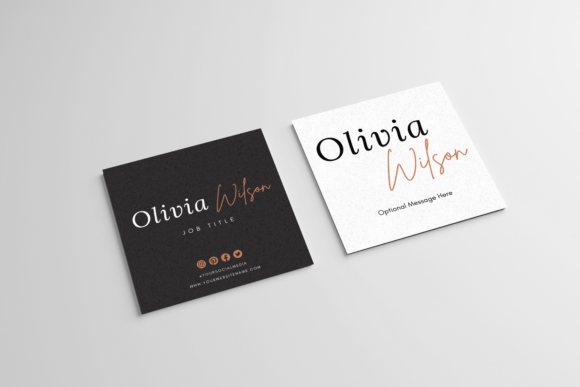
Square business cards break away from the traditional rectangular format, offering a bold and unconventional shape that instantly grabs attention. At 3×3 inches, they’re compact yet powerful—ideal for creative professionals who want their identity to reflect innovation. Whether you're a designer, blogger, or small business owner, square cards allow you to present information with a clean layout and a unique aesthetic.
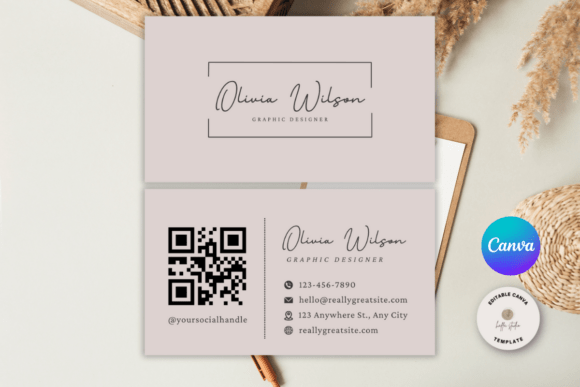
But what really sets them apart is the customizability. With an editable Canva template, you can easily adjust colors, fonts, graphics, and content without needing any design software. All changes are made through your browser, which means no downloads, no installations, and no technical hurdles. The result? A professional-looking business card that’s tailored to your brand and ready to go in minutes.
Why Choose a Digital Template?
This is a digital item only. No printed cards will be shipped to your door. Instead, you’ll receive a .zip file containing a high-quality PDF template designed for printing. This approach gives you full control over the final product, allowing you to print as many copies as needed at home or through professional services like Staples, Office Depot, or online providers such as Vistaprint.
The beauty of a digital template lies in its flexibility. You can update your contact info, rebrand, or experiment with new designs anytime. There’s also no waiting for delivery—once you download the files, you’re ready to print and distribute immediately. It’s fast, cost-effective, and ideal for anyone who values autonomy in their branding process.
How to Use Your Editable Square Business Card Template
Working with this template is straightforward if you have a basic understanding of Canva. After purchasing, you'll get a .zip file with everything you need to start editing right away. Here’s a quick breakdown of the steps:
- Download the File: Once purchased, extract the .zip file to access the PDF template inside.
- Create a Canva Account: If you don’t already have one, sign up for a free account on Canva.com.
- Edit the Design: Upload the PDF into Canva and begin customizing. Change text, add logos, adjust colors, and tweak layout elements to match your brand identity.
- Export and Print: When satisfied, export the final design as a printable PDF and choose your preferred printing method.
Each step is designed to be user-friendly, ensuring even those with minimal design experience can create something impressive. And because Canva offers drag-and-drop tools and pre-designed assets, you can focus more on your vision and less on the technicalities.
Real-World Applications and Ideas
Editable Square Business Cards aren’t just for swapping hands at networking events—they can be adapted for a wide range of purposes. Here are some creative ways different professionals can use them:
- Freelancers and Creatives: Showcase your portfolio link, social media handles, or a QR code that leads to your website. Square cards are great for adding a visual flair that reflects your artistic style.
- Entrepreneurs: Highlight your mission statement, tagline, or a catchy logo. Their bold shape makes them ideal for standing out in crowded markets.
- Event Planners and Wedding Coordinators: Use them as mini promotional flyers or guest gifts. Add event dates, hashtags, or even a photo to make it more personal.
- Educators and Trainers: Include a short quote or teaching philosophy. Square cards can serve as conversation starters when handed out at workshops or conferences.
- Marketing Professionals: Create branded cards that double as mini advertisements. Add campaign themes or client testimonials directly onto the card.
For instance, a graphic designer might use a minimalist square card with a bold font and a single color scheme to emphasize their clean aesthetic. Meanwhile, a local baker could incorporate a small illustration of their signature pastry, using the square space creatively to tell their story in a bite-sized format.
Design Tips for Maximum Impact
To ensure your square business card leaves a lasting impression, consider these practical tips:
- Keep It Simple: Don’t overcrowd the design. Use negative space wisely to let key elements breathe.
- Use High-Quality Imagery: Any photos or illustrations should be crisp and relevant to your brand.
- Consistency Is Key: Match your card’s style to your website, logo, and other marketing materials. Consistency builds recognition and trust.
- Make Text Readable: Choose legible fonts and ensure there’s enough contrast between background and text colors.
- Include a Call to Action: Whether it’s a URL, social media handle, or email address, guide the recipient on what to do next.
Also, think about how you’ll use the cards beyond handing them out. Could they become part of a packaging insert, a sample booklet, or a branded gift tag? Square cards lend themselves well to multi-use scenarios, especially in creative industries.
Who Should Consider These Cards?
If you’re someone who thrives on originality and wants your brand to feel authentic, then Editable Square Business Cards are worth considering. They’re particularly suited for:
- Startups: Stand out in a competitive market with a design that feels modern and intentional.
- Artists and Photographers: Leverage the extra canvas space to include a small gallery or a striking visual element.
- Coaches and Consultants: Use the card to display a short testimonial or a motivational phrase aligned with your message.
- Local Businesses: Reinforce community presence by creating cards that reflect your store’s vibe or theme.
- Students and New Grads: Build a strong personal brand early on with a customizable and affordable option.
No matter your role or industry, square cards offer a chance to redefine how people perceive your brand. Their compact size doesn’t limit impact—it amplifies it when used thoughtfully.
Printing Options: What You Need to Know
One of the greatest advantages of a digital template is the freedom to choose your printing method. Here’s how to decide:
Printing at Home
If you have access to a high-quality printer and card stock, printing at home can be a cost-effective solution. Just make sure your printer settings are set to "print actual size" to avoid scaling issues. Also, test print on regular paper before investing in cardstock to verify colors and alignment.
Professional Printing Services
For those who prefer a polished finish, stores like Staples or Office Depot offer easy-to-use kiosks where you can upload your file and order prints. Online services like Vistaprint also support square formats and often provide bulk pricing options. Local print shops may offer faster turnaround times and specialized finishes like glossy or matte coatings.
Whichever route you take, always confirm that the printing service supports 3×3 inch cards. Some platforms default to standard sizes, so it’s important to specify dimensions during the upload or order process.
Customization Made Easy with Canva
Canva is a game-changer for non-designers. Its intuitive interface allows users to effortlessly modify templates while maintaining professional quality. You don’t need to know how to use Adobe InDesign or Photoshop—just open the file in your browser and start dragging, dropping, and adjusting.
Here’s what you can expect from the Editable Square Business Cards template:
- Text Layers: Easily change your name, title, contact details, and taglines.
- Image Slots: Replace placeholders with your logo, headshot, or artwork.
- Color Schemes: Adjust backgrounds and accents to match your brand palette.
- Font Selections: Swap out fonts for a more personalized look.
Plus, Canva offers a library of icons, shapes, and illustrations that can help you enhance your design further. You can even add subtle animations or interactive elements if you plan to digitize the card for online use later.
Getting Started: Your First Edit
Here’s a simple project idea to kick off your customization journey:
- Open the template in Canva and replace the placeholder text with your real information.
- Add your logo or a relevant image to the top or center of the card.
- Choose two to three primary colors that align with your brand and apply them consistently across the design.
- Experiment with layouts—try stacking your name vertically or using a diagonal arrangement for added interest.
- Save your work regularly and preview the design in both digital and print modes to catch any formatting issues.
This initial edit gives you a foundation to build upon. As you gain confidence, you can explore more advanced features like layer blending, custom gradients, or even animated versions for digital sharing.
Final Thoughts on Making the Most of Your Template
Editable Square Business Cards are more than just a tool—they’re a canvas for your brand identity. By choosing a digital, customizable format, you’re embracing a modern approach to networking and self-promotion. The ability to tweak, reuse, and repurpose your design ensures long-term value and adaptability.
As you work with the template, remember that clarity and purpose are just as important as aesthetics. Let your design reflect not only who you are but also what you bring to the table. Whether you’re attending a conference, launching a new service, or building a personal brand, a well-crafted square business card can be the difference between being overlooked and being remembered.
So why settle for the ordinary when you can create something extraordinary? Explore the possibilities, stay true to your brand, and let your business card speak volumes—without ever having to wait for a shipment.